LESCO Bill Online – Check, Download & Print Duplicate Bill (2026)
Check your LESCO electricity bill online using reference number or customer ID. View, download & print duplicate bill instantly.
LESCO Online Bill Check — Complete Guide for Central Punjab Consumers (2026)
Lahore Electric Supply Company (LESCO) supplies electricity to more than 5 million consumers across central Punjab, serving residential, commercial, and agricultural connections throughout Lahore, Kasur, Sheikhupura, Okara, and Nankana Sahib. This updated guide makes LESCO online bill check easy, fast, and secure for every LESCO consumer.
This hub page on lescopaymybill.pk/ is your single reference for LESCO online bill check, duplicate bill download, bill printing, understanding bill components, tariff rates, peak hours, complaint registration, and every customer service channel LESCO offers. We have structured this guide the way Pakistani consumers actually search — step by step, in plain Urdu-friendly English, with comparison tables and trust references to official portals.
Why LESCO Online Bill Check Matters
Gone are the days when you waited for a paper bill to know your payable amount. LESCO consumers across Central Punjab — from Kasur farmers to Sheikhupura shopkeepers — now rely on online bill checking for several practical reasons:
- Instant access — View your current bill within seconds, any time of day or night.
- Duplicate bill — Download a PDF copy when the physical bill is lost, delayed, or soaked in the monsoon.
- Payment planning — Know your exact due date and amount before visiting the bank or opening JazzCash.
- Dispute preparation — Compare meter readings and billed units before filing a complaint.
- Budget control — Track monthly consumption trends and plan for seasonal spikes in summer.
Unlike generic bill-check blogs that only repeat “go to the website and enter your number,” this guide breaks down every line on your LESCO bill, explains why your amount jumped last month, and connects you to the right official portal for complaints, new connections, and tariff information.
For a fast and secure LESCO online bill check experience, keep your 14-digit reference number saved on your phone.
LESCO Coverage Area — 5 Districts of Central Punjab
LESCO (Lahore Electric Supply Company) is one of Pakistan’s largest distribution companies (DISCOs) under NEPRA regulation. Its licensed area covers 5 administrative districts in central Punjab:
| District | Major Cities / Areas |
|---|---|
| Lahore | Lahore City, Model Town, DHA, Gulberg, Johar Town, Cantt |
| Kasur | Kasur City, Chunian, Pattoki, Khudian Khas |
| Sheikhupura | Sheikhupura, Muridke, Safdarabad, Ferozewala |
| Okara | Okara City, Renala Khurd, Depalpur |
| Nankana Sahib | Nankana Sahib, Sangla Hill, Shah Kot |
If your address falls in any of these districts, your electricity bill carries the LESCO logo and your online check must go through the LESCO bill portal at bill.pitc.com.pk/lescobill.
This LESCO online bill check information is updated for 2026 and verified against official LESCO and PITC sources.
Trust & Official Sources
lescopaymybill.pk/ compiles consumer guidance from verified official sources. Always cross-check critical information — especially tariff rates and peak hours — on these portals:
| Source | URL | Purpose |
|---|---|---|
| LESCO Official Website | lesco.gov.pk | Company information, circle offices, announcements |
| PITC LESCO Bill Portal | bill.pitc.com.pk/lescobill | Official online bill check and duplicate download |
| PITC Peak/Off-Peak Timings | bill.pitc.com.pk/peak-offpeak-timing | Seasonal peak hours schedule |
| ENC New Connection Portal | enc.com.pk | Apply for new electricity connections nationwide |
| CCMS Complaint Portal | ccms.pitc.com.pk | Register complaints, track status |
| LESCO Load Shedding Portal | lesco.gov.pk/LoadSheddingShutdownSchedule | Load shedding schedule by feeder |
| NEPRA LESCO Tariff | nepra.org.pk/tariff/Distribution%20LESCO.php | Approved tariff schedules |
Disclaimer: lescopaymybill.pk/ is an independent information resource. We are not affiliated with LESCO, PITC, or NEPRA. For binding decisions on billing disputes, new connections, or tariff applications, contact LESCO directly or visit your nearest customer service center.
Consumers across Lahore, Kasur, and Sheikhupura rely on this LESCO online bill check guide for convenient monthly bill management.
LESCO Online Bill Check — Step-by-Step Guide
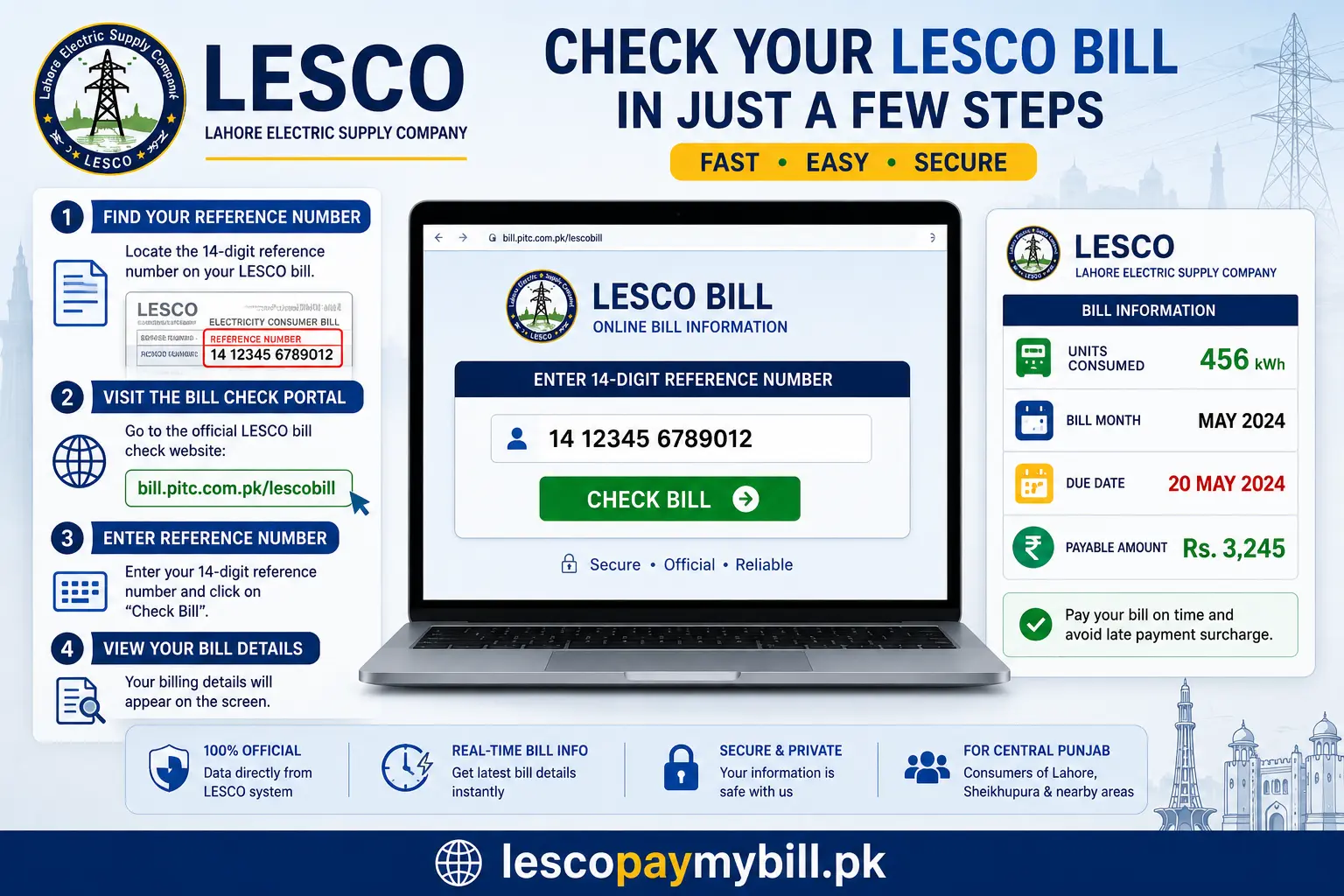
Checking your LESCO bill online takes less than two minutes. Follow these steps:
Step 1: Gather Your Reference Number or Customer ID
You need one of two identifiers printed on your LESCO electricity bill:
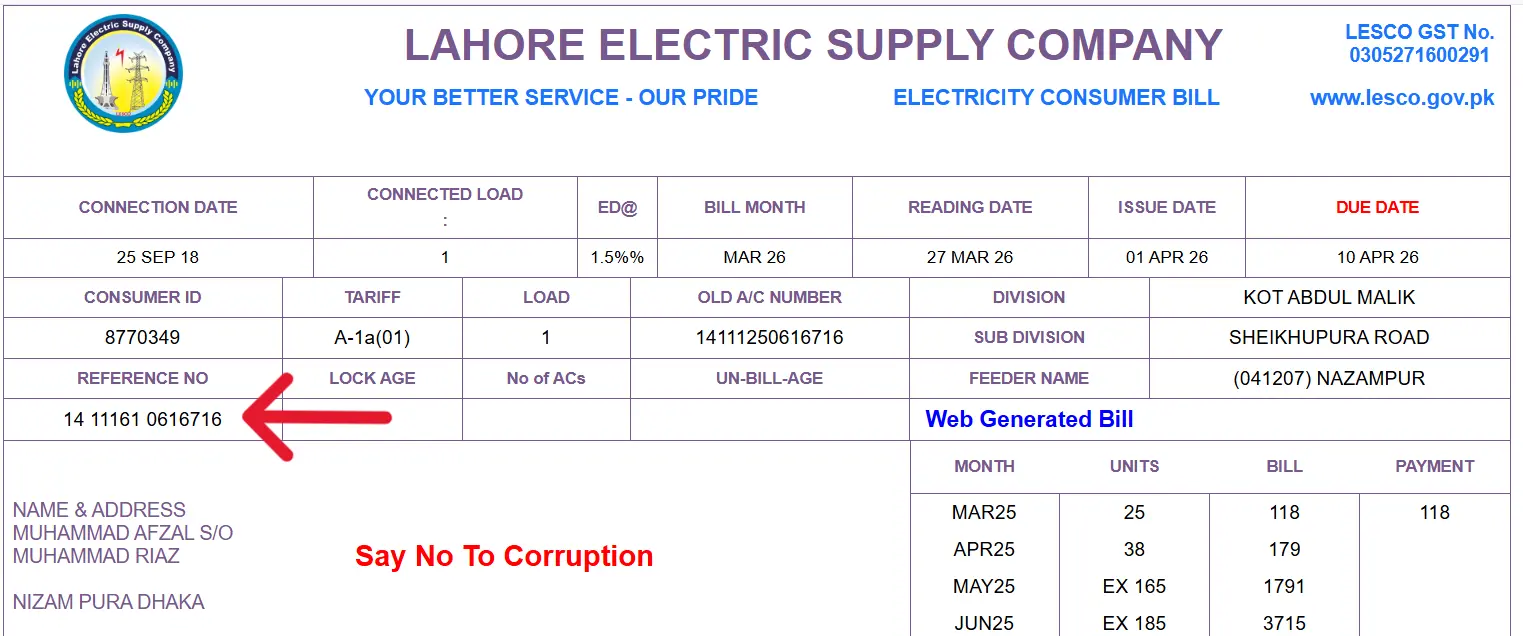
- 14-digit Reference Number — The primary identifier for online bill check. Found at the top-left of your bill, usually formatted as
12 34567 8901234(spaces may vary). - 7-Digit Customer ID — An alternative identifier, often labeled “Customer ID” on the bill face.
If you have neither, check any previous bill, your bank payment receipt, or contact LESCO customer service.
Step 2: Open the Official LESCO Bill Portal
Navigate to the PITC-hosted LESCO bill portal:
Official URL: bill.pitc.com.pk/lescobill
Alternatively, use the bill checker on lescopaymybill.pk/ which redirects to the same official data source.
Step 3: Enter Your Reference Number or Customer ID
- Select Reference Number or Customer ID from the dropdown (if available).
- Type all digits without spaces. For a 14-digit reference number, enter exactly 14 digits.
- Click Search, View Bill, or Submit depending on the portal version.
Step 4: Review Your Bill Details
Once loaded, your online bill displays:
- Consumer name and address
- Billing month and issue date
- Meter reading (previous and current)
- Units consumed (kWh)
- Bill amount breakdown (charges and taxes)
- Due date and amount after due date (surcharge)
- Reference number and customer ID for payment
Step 5: Download or Print
Click Download to save a PDF duplicate bill, or Print for a paper copy. This duplicate is accepted at banks, Easypaisa, JazzCash, and LESCO-designated payment points.
Quick Reference: Online Bill Check at a Glance
| Detail | Information |
|---|---|
| Portal | bill.pitc.com.pk/lescobill |
| Reference Number | 14 digits |
| Customer ID | 7 digits |
| Bill Format | PDF duplicate |
| Cost | Free |
| Availability | 24/7 |
The easiest LESCO online bill check method uses the official portal — no registration, no app download, and instant results.
LESCO Duplicate Bill Download
Lost your paper bill? Need a copy for your employer, landlord, or tax records? LESCO provides free duplicate bill download through the PITC portal.
When You Need a Duplicate Bill
- Physical bill not delivered by post
- Bill damaged or unreadable
- Payment at bank requires a printed copy
- Proof of address or utility bill for documentation
- Comparing current bill with previous months
How to Download LESCO Duplicate Bill
- Go to bill.pitc.com.pk/lescobill.
- Enter your 14-digit reference number.
- Click to view the bill.
- Select Download — a PDF file saves to your device.
- Open the PDF to verify name, amount, and due date before payment.
The duplicate bill is identical to the original issued by LESCO. It contains the same barcode, reference number, and payment information. Banks and digital wallets accept it without question.
Pro tip: Save your duplicate bill PDF each month in a folder named by billing month (e.g., LESCO-Jan-2026.pdf). This creates a personal record useful for tracking consumption and resolving disputes.
A reliable LESCO online bill check workflow helps you avoid late fees and dispute billing errors before the due date.
LESCO Reference Number — What It Is and Where to Find It
The LESCO reference number is a unique 14-digit code assigned to every electricity connection. It is the single most important number for online bill check, payment, and complaint registration.
Format and Structure
- Length: 14 digits
- Example:
12345678901234 - On bill: Top section, often labeled “Ref. No.” or “Reference Number”
- Spacing: May appear with spaces (e.g.,
12 34567 8901234) — enter without spaces online
Reference Number vs. Customer ID
| Identifier | Digits | Primary Use |
|---|---|---|
| Reference Number | 14 | Bill check, payment, complaints |
| Customer ID | 7 | Alternative bill check, CCMS complaints |
| Account Number | Varies | Internal LESCO records |
Always use the 14-digit reference number first. If the portal rejects it, try the 7-digit customer ID.
Lost Reference Number?
- Check any previous LESCO bill (paper or PDF)
- Review bank payment receipts — reference number is printed on them
- Visit your nearest LESCO customer service center with your CNIC and address proof
- Call LESCO helpline 0800-00118 or 118
Use this LESCO online bill check section as your quick reference when visiting a LESCO customer service center.
LESCO Customer ID — Alternative Bill Check Method
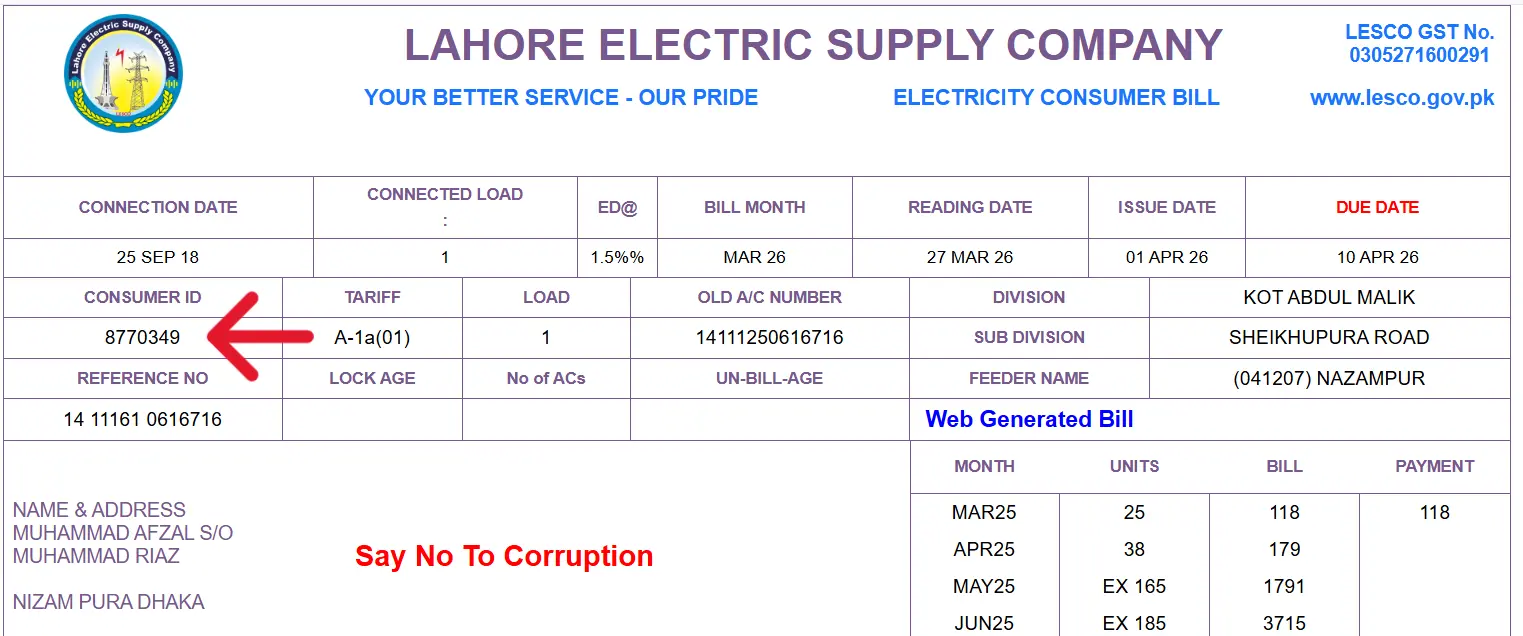
The LESCO customer ID is a 7-digit identifier linked to your connection. Some consumers find it easier to remember than the longer reference number.
Where to Find Customer ID
- Printed on the bill face, labeled “Customer ID” or “Consumer ID”
- Available at LESCO customer service centers upon CNIC verification
- Sometimes shown in SMS bill alerts (if subscribed)
Using Customer ID Online
On bill.pitc.com.pk/lescobill, select “Customer ID” from the input type dropdown (when available), enter all 7 digits, and submit. The bill display is identical to a reference-number search.
If one identifier fails, try the other. Both map to the same connection and bill.
Official LESCO online bill check channels remain the most secure option for Central Punjab electricity consumers.
LESCO Bill Download — PDF Format and Uses
LESCO bills downloaded online are standard PDF files compatible with any device — Android phone, laptop, or office printer.
PDF Bill Contents
- LESCO logo and billing month header
- Consumer name, address, and connection type
- Meter number and reading dates
- Units consumed and charge breakdown
- Total payable and due date
- Barcode for bank scanning
- 14-digit reference number for payment
Accepted Uses of Downloaded Bill
| Use Case | Accepted? |
|---|---|
| Bank over-the-counter payment | Yes |
| Easypaisa / JazzCash bill payment | Yes |
| Employer utility proof | Yes |
| Tax / documentation | Yes (verify with authority) |
| Court or legal proceedings | Yes (with official stamp if required) |
For a fast and secure LESCO online bill check experience, keep your 14-digit reference number saved on your phone.
LESCO Bill Print — How to Print Your Duplicate Bill
Printing your LESCO bill is straightforward after downloading the PDF:
- Download the duplicate bill from the PITC portal.
- Open the PDF in Adobe Reader, Chrome, or any PDF viewer.
- Press Ctrl + P (Windows) or Cmd + P (Mac).
- Select your printer — inkjet or laser both work.
- Choose A4 paper size (standard for LESCO bills).
- Print in color or black-and-white — both are accepted at payment counters.
For mobile printing, share the PDF to a printer-enabled app or visit a print shop with the file on your phone. Most print shops in Lahore, Sheikhupura, and other LESCO cities recognize LESCO bill format and charge Rs. 5–10 per copy.
This LESCO online bill check information is updated for 2026 and verified against official LESCO and PITC sources.
LESCO Bill Components — Complete Breakdown
Understanding every line on your LESCO bill prevents confusion when the amount seems higher than expected. Below is a detailed breakdown that most competitor sites skip.
Primary Bill Sections
1. Consumer Information Block
- Name — Registered consumer name (must match CNIC for name change requests)
- Address — Service address of the connection
- Connection Type — Residential (A-1), Commercial (A-2), Industrial, Agricultural
- Sanctioned Load — Approved load in kW/kVA
- Meter Number — Physical meter identifier
2. Meter Reading Section
| Field | Description |
|---|---|
| Previous Reading | Meter reading at start of billing cycle |
| Current Reading | Meter reading at end of billing cycle |
| Units Consumed | Difference between readings (kWh) |
| Multiplying Factor | Applied for CT meters (commercial/industrial) |
| Billing Days | Number of days in billing period |
3. Charge Breakdown
| Component | What It Means |
|---|---|
| Energy Charges | Cost per unit based on tariff slab (rate × units) |
| Fixed Charges | Monthly fixed charge based on sanctioned load |
| Fuel Price Adjustment (FPA) | Adjustment for fuel cost changes — often the biggest variable |
| Quarterly Adjustment | Periodic tariff/true-up adjustment |
| FC Surcharge | Financing cost surcharge on tariff |
| Electricity Duty | Provincial duty on electricity consumption |
| TV Fee | Pakistan Television fee (if applicable to connection type) |
| GST / General Sales Tax | Federal tax on electricity bill |
| Income Tax | Applicable on commercial/industrial connections |
| Meter Rent | Monthly meter rental charge |
| Late Payment Surcharge (LPS) | Penalty if paid after due date |
4. Summary Block
- Bill Amount — Total before any payment
- Arrears — Unpaid balance from previous months
- Subsidies / Adjustments — Government subsidy credits if applicable
- Amount Payable — Final amount due by due date
- Amount After Due Date — Total including LPS penalty
Why Your Bill Amount Changes Month to Month
| Factor | Effect on Bill |
|---|---|
| Higher units consumed (AC, heaters) | Increases energy charges |
| FPA increase in tariff | Increases regardless of units |
| Slab change (crossing 200/300/700 units) | Rate per unit jumps |
| Late payment last month | Arrears + LPS added |
| Meter reading correction | One-time adjustment |
| Peak hour consumption (TOU meters) | Higher rate for peak units |
Use our LESCO Bill Calculator to estimate your next bill based on expected units.
Consumers across Lahore, Kasur, and Sheikhupura rely on this LESCO online bill check guide for convenient monthly bill management.
LESCO Bill Taxes and Government Charges Explained
Pakistani electricity bills include several statutory charges mandated by federal and provincial governments. LESCO acts as a collection agent — it does not set these taxes.
Tax and Duty Comparison Table
| Charge | Authority | Typical Application |
|---|---|---|
| Electricity Duty | Provincial | All consumers — percentage of energy charges |
| General Sales Tax (GST) | Federal | Most connection types |
| Income Tax | Federal | Commercial, industrial, high-consumption |
| TV Fee | Federal | Residential and selected categories |
| FC Surcharge | NEPRA/GoP | All consumers — debt servicing |
| Fuel Price Adjustment | NEPRA | Pass-through of fuel cost changes |
How to Verify Tax Legitimacy
Cross-check the applicable tariff and surcharges on NEPRA’s LESCO tariff page. If a charge appears that does not match the published tariff, file a complaint through CCMS or visit a customer service center.
The easiest LESCO online bill check method uses the official portal — no registration, no app download, and instant results.
LESCO Meter Reading — How It Works
LESCO meter reading is the foundation of your bill. Understanding the process helps you spot errors early.
Reading Cycle
- LESCO meter readers visit each area on a scheduled monthly cycle.
- Reading date varies by feeder and area — not the same day for all consumers.
- Estimated readings may be applied if the meter is inaccessible or reader cannot visit.
Types of LESCO Meters
| Meter Type | Description | Reading Method |
|---|---|---|
| Single-phase analog | Standard residential | Manual visual reading |
| Single-phase digital | Electronic display | Manual or remote |
| Three-phase | Commercial/industrial | Manual with CT factor |
| Smart meter | Advanced metering | Automatic remote reading |
Self-Reading and Disputes
If you believe the reader recorded a wrong value:
- Note your meter’s current display reading with a photo (date-stamped).
- Compare with the “Current Reading” on your bill.
- If mismatch is significant, register a complaint at ccms.pitc.com.pk within 7 days of bill issuance.
- LESCO may schedule a re-reading or meter testing.
For smart meter consumers, see our LESCO Smart Meter Information guide.
A reliable LESCO online bill check workflow helps you avoid late fees and dispute billing errors before the due date.
LESCO New Connection — How to Apply
Need a new electricity connection for a new home, shop, or plot? LESCO processes new connections through the national ENC (Electricity New Connection) portal.
Quick Overview
| Detail | Information |
|---|---|
| Portal | enc.com.pk |
| Application Fee | As per NEPRA/LESCO schedule |
| Processing Time | 15–45 days (varies by load and area) |
| Required Documents | CNIC, property proof, wiring certificate |
For the complete step-by-step process — application, demand notice payment, meter installation, and tracking — read our dedicated guide: LESCO New Connection.
Use this LESCO online bill check section as your quick reference when visiting a LESCO customer service center.
LESCO Complaint Registration — Billing, Meter, and Service Issues
LESCO handles consumer complaints through the CCMS (Customer Complaint Management System) portal and helpline channels.
Common Complaint Types
- Wrong meter reading / inflated bill
- Bill not received
- Load shedding beyond schedule
- Meter malfunction or stopped meter
- Voltage fluctuation / low voltage
- Unauthorized disconnection
- New connection delay
How to Register a Complaint
- Visit ccms.pitc.com.pk.
- Select LESCO as the distribution company.
- Enter your 14-digit reference number or 7-digit customer ID.
- Choose complaint category and sub-category.
- Describe the issue clearly with dates and meter readings if applicable.
- Submit and note your complaint tracking number.
- Track status online using the same portal.
Alternatively, call 0800-00118 or 118, or visit your circle office in person.
Full complaint guide: LESCO Complaint Registration.
Official LESCO online bill check channels remain the most secure option for Central Punjab electricity consumers.
LESCO Tariff Rates — Residential, Commercial, and Agricultural
LESCO tariff rates are set by NEPRA and published in the tariff schedule. Rates vary by connection category, sanctioned load, and consumption slab.
Residential (A-1) Slab Overview — Protected and Unprotected
| Consumption Slab (kWh/month) | Category | Notes |
|---|---|---|
| Up to 50 units | Life-line / protected | Lowest rate — targeted subsidy |
| 51–100 units | Protected | Subsidized rate |
| 101–200 units | Protected | Subsidized rate |
| 201–300 units | Unprotected | Standard slab rate |
| 301–700 units | Unprotected | Higher slab rate |
| Above 700 units | Unprotected | Highest slab rate |
Important: Actual per-unit rates change when NEPRA approves tariff revisions. FPA and quarterly adjustments add variable amounts on top of base rates. Always verify current rates on NEPRA LESCO tariff.
Commercial and Industrial Tariffs
- A-2 (Commercial) — Shops, offices, small businesses
- B-1/B-2 (Industrial) — Factories, manufacturing units
- Agricultural — Tube wells and farm connections with seasonal rates
Detailed slab rates, fixed charges, and time-of-use pricing: LESCO Tariff Rates.
For a fast and secure LESCO online bill check experience, keep your 14-digit reference number saved on your phone.
Meter Reading and Bill Calculation
Electricity bills are generated based on meter readings.
Meter readers record:
- Previous meter reading
- Current meter reading
The difference between these readings determines electricity consumption.
Formula
Current Reading - Previous Reading = Units ConsumedThe total units consumed directly affect the final bill amount.
Consumers should occasionally verify readings to ensure accuracy.
Why Bills Increase
Many consumers wonder why their bills suddenly become higher.
Several factors may contribute to increased billing:
- Higher electricity consumption
- Seasonal usage
- Air conditioners
- Electric heaters
- Fuel price adjustments
- Tariff changes
- Additional taxes
Monitoring monthly usage can help control electricity expenses.
LESCO Payment Methods — How to Pay Your Bill
LESCO accepts bill payment through multiple channels across Central Punjab. Use your 14-digit reference number for all methods.
Payment Channels Comparison
| Method | How to Pay | Convenience Fee |
|---|---|---|
| Bank branches | Present bill or reference number at HBL, UBL, MCB, ABL, NBP, and other designated banks | Usually free |
| ATM | Bill payment option → LESCO → enter reference number | Free |
| Easypaisa | App → Bill Payment → Electricity → LESCO | Small fee may apply |
| JazzCash | App → Bill Payment → LESCO | Small fee may apply |
| 1Link online banking | Internet banking → bill payment section | Free |
| LESCO cash counters | Circle office customer service centers | Free |
Payment Tips
- Pay before the due date to avoid Late Payment Surcharge (LPS).
- Keep the payment receipt until the next bill confirms credit.
- Double-check the reference number before confirming payment — wrong payments are difficult to reverse.
- Digital payments process within 24–48 hours on your LESCO account.
This LESCO online bill check information is updated for 2026 and verified against official LESCO and PITC sources.
LESCO Peak Hours — Seasonal Schedule from PITC
NEPRA’s time-of-use (TOU) framework defines peak and off-peak hours for consumers with peak-hour meters. LESCO publishes the official schedule through PITC.
Seasonal Peak Hours Table (Official PITC Schedule)
| Season | Months | Peak Hours | Off-Peak Hours |
|---|---|---|---|
| Winter | December – February | 5:00 PM – 9:00 PM | All other hours |
| Spring | March – May | 6:00 PM – 10:00 PM | All other hours |
| Summer | June – August | 7:00 PM – 11:00 PM | All other hours |
| Autumn | September – November | 6:00 PM – 10:00 PM | All other hours |
Source: bill.pitc.com.pk/peak-offpeak-timing and NEPRA TOU determinations
Also verify at: bill.pitc.com.pk/peak-offpeak-timing
What Peak Hours Mean for Your Bill
- Units consumed during peak hours are billed at a higher TOU rate (for meters configured for peak/off-peak billing).
- Units during off-peak hours are billed at a lower rate.
- Standard residential meters (majority of LESCO consumers) are not on TOU — all units billed at slab rate regardless of time.
- Shift high-load appliances (AC, water pump, washing machine) to off-peak hours if you have a TOU meter.
Complete peak hours guide with tips: LESCO Peak Hours.
Consumers across Lahore, Kasur, and Sheikhupura rely on this LESCO online bill check guide for convenient monthly bill management.
LESCO Smart Meter — Features and Benefits
LESCO is gradually deploying smart meters across its network, starting with high-loss areas and urban centers in Lahore and Sheikhupura divisions.
Smart Meter Capabilities
| Feature | Benefit |
|---|---|
| Remote reading | No estimated bills — accurate monthly data |
| Real-time consumption data | Monitor usage patterns via display or app |
| Outage detection | Faster fault identification by LESCO |
| Tamper detection | Reduces unauthorized interference |
| TOU billing support | Automatic peak/off-peak unit segregation |
Smart Meter vs. Traditional Meter
| Aspect | Traditional Meter | Smart Meter |
|---|---|---|
| Reading method | Manual monthly visit | Automatic remote |
| Billing accuracy | Prone to estimation | Higher accuracy |
| Consumer visibility | Read dial only | Digital display + data |
| Peak/off-peak billing | Requires separate TOU meter | Built-in capability |
| Complaint on wrong reading | Common | Less frequent |
Learn more: LESCO Smart Meter Information.
The easiest LESCO online bill check method uses the official portal — no registration, no app download, and instant results.
LESCO Net Metering — Solar Connection for Consumers
LESCO consumers who install solar panels can apply for net metering under NEPRA’s Alternative & Renewable Energy policy. This allows you to export excess solar generation to the grid and receive credit on your bill.
Net Metering Overview
| Detail | Information |
|---|---|
| Eligibility | LESCO consumers with approved solar installation |
| Application | Through LESCO customer service center |
| Meter Type | Bidirectional (import/export) meter |
| Credit | Excess units exported offset imported units |
| Capacity | Up to sanctioned load capacity |
Net Metering Application Steps
- Install solar system through a certified vendor.
- Obtain electrical inspection and compliance certificate.
- Submit net metering application at LESCO circle office.
- LESCO installs bidirectional meter after approval.
- Monthly bill reflects import minus export (net consumption).
Net metering reduces bills significantly for consumers in sunny regions like Sheikhupura, Okara, and Lahore. Combine with off-peak usage for maximum savings.
A reliable LESCO online bill check workflow helps you avoid late fees and dispute billing errors before the due date.
LESCO Customer Services — Centers, Hours, and Services
LESCO operates customer service centers and circle offices across all 5 districts. These centers handle face-to-face requests that cannot be resolved online.
Services Available at Customer Service Centers
- New connection applications and status
- Bill correction and meter re-reading requests
- Name change and address update
- Duplicate bill issuance (stamped)
- Complaint escalation
- Load extension / reduction applications
- Net metering applications
- Meter testing requests
Find your nearest center: LESCO Customer Service Centers.
LESCO Circle Offices — Major Locations
| Circle | City / Location | Coverage |
|---|---|---|
| North Lahore Circle | Shahdara, Ravi Road | Northern Lahore |
| Central Lahore Circle | Multan Road, Ichhra | Central Lahore |
| Eastern Lahore Circle | Shalimar, WAPDA Road | Eastern Lahore |
| South-Eastern Lahore Circle | Ghazi Road, Defence | Southern Lahore |
| Kasur Circle | Kasur | Kasur district |
| Sheikhupura Circle | Sheikhupura | Sheikhupura district |
| Okara Circle | Okara | Okara district |
| Nankana Circle | Nankana Sahib | Nankana Sahib district |
Visit lesco.gov.pk for updated office addresses and phone numbers.
Use this LESCO online bill check section as your quick reference when visiting a LESCO customer service center.
LESCO Helpline Numbers — 24/7 Customer Support
| Helpline | Number | Purpose |
|---|---|---|
| LESCO Toll-Free | 0800-00118 | Billing, complaints, general inquiries |
| LESCO Short Code | 118 | Quick access from landline and mobile |
| LESCO HQ | 111-000-118 | Head office escalation |
| SMS Service | 8118 | Bill info via SMS (send reference number) |
| CCMS Online | ccms.pitc.com.pk | Complaint registration and tracking |
| LESCO Website | lesco.gov.pk | Office addresses, announcements |
When to Call vs. Visit vs. Online
| Issue | Best Channel |
|---|---|
| Bill check / duplicate | Online portal (fastest) |
| Wrong meter reading | CCMS online + helpline |
| Power outage (area-wide) | 118 or feeder complaint |
| New connection | ENC portal + circle office |
| Name change | Circle office with documents |
| Load shedding schedule | CCMS feeder details online |
Complete helpline directory: LESCO Helpline Numbers.
Official LESCO online bill check channels remain the most secure option for Central Punjab electricity consumers.
LESCO Regional Offices — Central Punjab Directory
LESCO’s organizational structure divides Central Punjab into circles and divisions for operational management. Consumers typically interact with customer service centers at the division level.
How to Find Your Regional Office
- Identify your district from the 13 LESCO districts.
- Visit lesco.gov.pk → Contact / Office Locator.
- Or check our LESCO Customer Service Centers page for addresses.
- Call 0800-00118 and provide your reference number — the agent can direct you to the correct office.
Bring your CNIC, a copy of your latest bill, and any supporting documents when visiting in person.
For a fast and secure LESCO online bill check experience, keep your 14-digit reference number saved on your phone.
Online Bill Payment Methods
Paying electricity bills has become much easier due to digital payment options.
Consumers can choose from multiple payment methods.
Popular Payment Options
| Method | Availability |
|---|---|
| Bank Branches | Available |
| ATM Machines | Available |
| Mobile Banking | Available |
| Internet Banking | Available |
| JazzCash | Available |
| Easypaisa | Available |
| Mobile Wallets | Available |
Digital payment methods help consumers avoid long queues and save time.
JazzCash Bill Payment
JazzCash provides a convenient way to pay electricity bills.
Benefits
- Fast transactions
- Mobile access
- Payment history
- 24/7 availability
Many consumers prefer mobile wallets for convenience and speed.
Easypaisa Bill Payment
Easypaisa is another widely used payment platform.
Consumers can pay bills through:
- Mobile App
- Agent Network
- Retail Locations
Benefits include:
- Quick payments
- Easy access
- Instant confirmation
Banking Channels
Most major banks support electricity bill payments through:
- Internet banking
- Mobile banking apps
- ATM networks
- Physical branches
Banking channels remain among the most trusted payment options.
LESCO Bill Calculator — Estimate Your Next Bill
Want to know what your bill will be before the meter reader arrives? Use the LESCO Bill Calculator on lescopaymybill.pk/.
How the Calculator Works
- Select your connection type (residential, commercial, agricultural).
- Enter expected units consumed (kWh) for the month.
- Select billing month (for FPA estimate).
- Click Calculate.
- View estimated energy charges, taxes, and total payable.
The calculator uses published NEPRA tariff slabs and typical FPA values. Actual bill may vary slightly due to quarterly adjustments and exact FPA for the month.
Example Estimates (Residential A-1, indicative only):
| Units (kWh) | Approximate Bill Range (PKR) |
|---|---|
| 100 | 1,500 – 3,000 |
| 200 | 4,000 – 7,000 |
| 300 | 8,000 – 14,000 |
| 500 | 18,000 – 30,000 |
| 700+ | 30,000 – 50,000+ |
*Ranges include FPA variability. Use calculator for current estimate.*
This LESCO online bill check information is updated for 2026 and verified against official LESCO and PITC sources.
LESCO Load Shedding Schedule
LESCO publishes feeder-level load shedding schedules through the CCMS portal. Schedules change seasonally and during system emergencies.
How to Check Load Shedding for Your Area
- Visit lesco.gov.pk/LoadSheddingShutdownSchedule.
- Select LESCO as the company.
- Enter your area, feeder name, or reference number.
- View scheduled outage timings for your feeder.
For detailed schedules and complaint escalation if outages exceed published hours: LESCO Load Shedding Schedule.
Consumers across Lahore, Kasur, and Sheikhupura rely on this LESCO online bill check guide for convenient monthly bill management.
LESCO Name Change Procedure
If you purchased a property or need to update the consumer name on your LESCO bill, the name change process requires documentation and a visit to the customer service center.
Required Documents
- Original and copy of CNIC (new owner)
- Copy of previous owner’s CNIC (if applicable)
- Property transfer deed / registry / allotment letter
- Latest LESCO bill copy
- Application form (available at customer service center)
Full procedure: LESCO Name Change Procedure.
The easiest LESCO online bill check method uses the official portal — no registration, no app download, and instant results.
Energy Saving Tips for LESCO Consumers
Reducing units consumed is the most direct way to lower your LESCO bill. Central Punjab’s extreme summer heat makes energy efficiency especially important.
High-Impact Saving Tips
| Tip | Estimated Savings |
|---|---|
| Set AC to 26°C instead of 18°C | 20–30% on cooling costs |
| Use LED bulbs instead of incandescent | 80% on lighting |
| Insulate roof and walls | 15–25% on cooling |
| Run water pump during off-peak hours | Lower TOU rate (if applicable) |
| Unplug idle chargers and appliances | 5–10% overall |
| Service AC units annually | 10–15% on cooling |
| Use fan alongside AC at higher temperature | 30%+ on AC costs |
Seasonal Advice for Lahore & Central Punjab
- Summer (April–October): Peak AC usage — clean filters monthly, seal windows, use curtains.
- Winter (November–March): Lower consumption — good time to build protected slab buffer.
- Harvest season: Agricultural consumers — schedule tube well runs during off-peak hours.
A reliable LESCO online bill check workflow helps you avoid late fees and dispute billing errors before the due date.
LESCO vs. Other DISCOs — Quick Comparison
Pakistan has multiple DISCOs. If you are unsure which company serves your area:
| DISCO | Region | Bill Check Portal |
|---|---|---|
| LESCO | Lahore & Central Punjab (5 districts) | bill.pitc.com.pk/lescobill |
| MEPCO | South Punjab | bill.pitc.com.pk/mepcobill |
| FESCO | Faisalabad | bill.pitc.com.pk/fescobill |
| IESCO | Islamabad | bill.pitc.com.pk/iescobill |
| GEPCO | Gujranwala | bill.pitc.com.pk/gepcobill |
| PESCO | KPK | bill.pitc.com.pk/pescobill |
If your bill shows the LESCO logo and your address is in Lahore, Kasur, Sheikhupura, Okara, or Nankana Sahib, use the LESCO portal — not MEPCO or FESCO.
Use this LESCO online bill check section as your quick reference when visiting a LESCO customer service center.
Understanding Taxes on Electricity Bills
Electricity bills include various taxes and duties imposed under applicable regulations.
Many consumers focus only on unit charges while ignoring the tax section.
Common Taxes Found on Bills
| Tax Type | Purpose |
|---|---|
| GST | General Sales Tax |
| Electricity Duty | Provincial duty |
| TV Fee | Applicable service charge |
| Income Tax | Applicable consumer categories |
| Sales Tax | Government taxation |
The amount of tax may vary depending on consumer category and electricity usage.
What is Fuel Price Adjustment (FPA)?
Fuel Price Adjustment (FPA) is one of the most discussed components of electricity bills.
It reflects changes in fuel costs used for electricity generation.
When fuel prices increase, the adjustment amount may increase.
When fuel prices decrease, consumers may receive relief through reduced adjustments.
FPA May Depend On
- International fuel prices
- Generation costs
- Government policies
- Energy mix
Consumers often notice FPA charges separately on electricity bills.
Quarterly Tariff Adjustments (QTA)
Another important component is the Quarterly Tariff Adjustment (QTA).
QTA reflects adjustments approved periodically to recover costs associated with electricity generation and distribution.
These adjustments may result in:
- Additional charges
- Temporary relief
- Revised billing amounts
Consumers should review official tariff notifications for updated information.
Frequently Asked Questions (FAQs)
What is the easiest way to complete LESCO online bill check?
The fastest and most reliable LESCO online bill check method is through the official PITC portal or our step-by-step guide on lescopaymybill.pk/.
(FAQs)
How do I check my LESCO bill online?
Enter your 14-digit reference number or 7-digit customer ID on bill.pitc.com.pk/lescobill or use the checker on lescopaymybill.pk/. Your current bill appears instantly with due date, units consumed, and payable amount.
Can I download a duplicate LESCO bill?
Yes. After retrieving your bill online, click Download to save a PDF duplicate. This copy is valid for payment at banks, Easypaisa, JazzCash, and authorized payment channels across Central Punjab.
What is the LESCO reference number format?
The LESCO reference number is 14 digits long. It appears at the top of your electricity bill, often formatted with spaces. Enter all 14 digits without spaces on the online portal. The suffix letter U (urban) or R (rural) printed after the number is not entered online — digits only.
What is the difference between reference number and customer ID?
The reference number (14 digits) is the primary identifier for bill check and payment. The customer ID (7 digits) is an alternative identifier for the same connection. Both retrieve the same bill.
How do I pay my LESCO bill online?
Pay through Easypaisa, JazzCash, or your bank’s internet banking / ATM. Select LESCO as the electricity company and enter your 14-digit reference number. Payment processes within 24–48 hours.
What is the LESCO helpline number?
Call 0800-00118 (toll-free) or 118 for billing inquiries, complaints, and general customer support. For online complaints, use ccms.pitc.com.pk.
Why is my LESCO bill so high this month?
Common reasons: higher units consumed (especially AC in summer), FPA increase, crossing into a higher tariff slab, arrears from previous months, or a corrected meter reading. Compare units consumed with previous months on your duplicate bills.
How do I register a complaint against LESCO?
Visit ccms.pitc.com.pk, select LESCO, enter your reference number, choose the complaint type, and submit. Note your tracking number to monitor resolution status.
What are LESCO peak hours?
Per the official PITC schedule: Summer (April–October): Peak 6 PM–10 PM. Winter (November–March): Peak 5 PM–9 PM. Off-peak is all other hours. Standard residential meters are not on time-of-use billing.
How do I apply for a new LESCO connection?
Apply through the ENC portal at enc.com.pk with your CNIC and property documents. See our LESCO New Connection guide for the full process.
Can I check LESCO load shedding schedule online?
Yes. Visit lesco.gov.pk/LoadSheddingShutdownSchedule, select LESCO, and search by your feeder or area to view scheduled outage times.
Is the lescopaymybill.pk/ LESCO bill check official?
lescopaymybill.pk/ provides consumer guidance and links to the official PITC LESCO bill portal. Bill data comes from the same official source as bill.pitc.com.pk/lescobill. We are an independent information platform, not affiliated with LESCO.
Lesco Online Bill Check — Expert Tips
For a fast and secure LESCO online bill check experience, keep your 14-digit reference number saved on your phone.
This LESCO online bill check information is updated for 2026 and verified against official LESCO and PITC sources.
Consumers across Lahore, Kasur, and Sheikhupura rely on this LESCO online bill check guide for convenient monthly bill management.
The easiest LESCO online bill check method uses the official portal — no registration, no app download, and instant results.
A reliable LESCO online bill check workflow helps you avoid late fees and dispute billing errors before the due date.
Use this LESCO online bill check section as your quick reference when visiting a LESCO customer service center.
Official LESCO online bill check channels remain the most secure option for Central Punjab electricity consumers.
For a fast and secure LESCO online bill check experience, keep your 14-digit reference number saved on your phone.
This LESCO online bill check information is updated for 2026 and verified against official LESCO and PITC sources.
Consumers across Lahore, Kasur, and Sheikhupura rely on this LESCO online bill check guide for convenient monthly bill management.
The easiest LESCO online bill check method uses the official portal — no registration, no app download, and instant results.
A reliable LESCO online bill check workflow helps you avoid late fees and dispute billing errors before the due date.
Conclusion
LESCO online bill check is the fastest way for Central Punjab consumers to stay informed about their electricity bills. With your 14-digit reference number or 7-digit customer ID, you can view, download, and print your duplicate bill in seconds through the official PITC portal at bill.pitc.com.pk/lescobill.
This guide on lescopaymybill.pk/ covers everything from bill components and taxes to tariff rates, peak hours, payment methods, complaint registration, and customer service contacts. Bookmark this page and explore our supporting guides for deeper coverage of each topic.
Key takeaways:
- Use your 14-digit reference number for bill check and payment.
- Download a free duplicate bill PDF anytime from the PITC portal.
- Understand bill components to spot errors and avoid overpayment.
- Pay before the due date to avoid Late Payment Surcharge.
- Register complaints at ccms.pitc.com.pk or call 0800-00118.
- Check peak hours and use our bill calculator to manage costs.
For official announcements and circle office addresses, always refer to lesco.gov.pk. For tariff verification, consult NEPRA.
Related Guides
LESCO New Connection
Apply for a new electricity connection through the ENC portal — documents, fees, demand notice payment, and installation tracking.
Read Complete GuideLESCO Complaint Registration
Register billing, meter, and service complaints through CCMS with your reference number and track resolution status online.
Check Detailed InstructionsLESCO Tariff Rates
Current NEPRA-approved residential, commercial, and agricultural tariff slabs with per-unit rates and fixed charges.
Learn MoreLESCO Peak Hours
Official seasonal peak and off-peak hours from PITC — summer and winter schedules for time-of-use meter consumers.
View Full ProcessRecommended Reading
LESCO Bill Calculator
Estimate your next electricity bill by entering expected units — includes slab rates, FPA, and tax calculations.
Read Complete GuideLESCO Smart Meter Information
Learn about LESCO smart meter rollout, features, remote reading, and how it affects your billing accuracy.
Check Detailed InstructionsLESCO Name Change Procedure
Update the consumer name on your LESCO bill after property transfer — required documents and circle office process.
Learn MoreLESCO Load Shedding Schedule
Check feeder-level load shedding timings for your area through the CCMS portal and know your outage schedule.
View Full ProcessUseful Resources
LESCO Customer Service Centers
Find LESCO customer service center addresses across all 13 Central Punjab districts with services and office hours.
Read Complete GuideLESCO Helpline Numbers
Complete directory of LESCO helpline 0800-00118, short code 118, and circle office contact numbers.
Check Detailed Instructionslescopaymybill.pk/ — Home
Pakistan's electricity bill information platform — LESCO and other DISCO bill check, guides, and consumer resources.
Learn MoreOfficial LESCO Bill Portal (PITC)
Check and download your LESCO electricity bill directly from the official PITC portal at bill.pitc.com.pk/lescobill.
View Full Process